
Why Coupang Rocket Growth Requires a Barcode on Every SKU
Coupang Rocket Growth (로켓그로스) will not inbound a SKU unless every sellable unit carries a valid, scannable standard barcode. That is not a formatting preference — it is a hard receiving prerequisite. A unit that arrives at Coupang's fulfillment center without a code the system recognizes cannot be received, stored, picked, or processed on return, so the shipment stalls at the dock before your listing ever goes live.
If your retail packaging already carries a GTIN, EAN, or UPC code, you are most of the way there. If it doesn't, you have exactly one clean alternative: declare that the unit has no barcode and ask Coupang to generate one. What you cannot do is leave the field blank, guess, or assume the warehouse will improvise. And because the barcode locks the moment an inbound is created against the SKU, this is a pre-shipment check — not something you fix after the fact.
Why Rocket Growth treats the barcode as a hard prerequisite
Rocket Growth is a scan-driven fulfillment operation. Coupang stores your inventory, picks it, ships it, and processes returns — but at every one of those steps, a worker or a machine scans the unit to know what it is and where it goes.
That single fact drives the whole requirement. Each physical unit has to be uniquely identifiable at receiving, in storage, at pick, and again when a customer sends it back. A barcode is the identifier that makes that possible. Without it, the unit is anonymous to Coupang's warehouse management system, and an anonymous unit cannot be tracked through a network that moves millions of items a day.
This is also why the barcode is a unit-level requirement, not a shipment-level one. Under Rocket Growth you keep ownership of the inventory while Coupang handles the physical fulfillment, which means the warehouse has to identify your specific sellable unit — not the carton it traveled in.

What Coupang considers a "valid" barcode
"Valid" has a specific meaning here, and it is stricter than most brands expect. Coupang checks the code at product creation and rejects anything that doesn't conform, which is why format problems surface long before your first pallet ships.
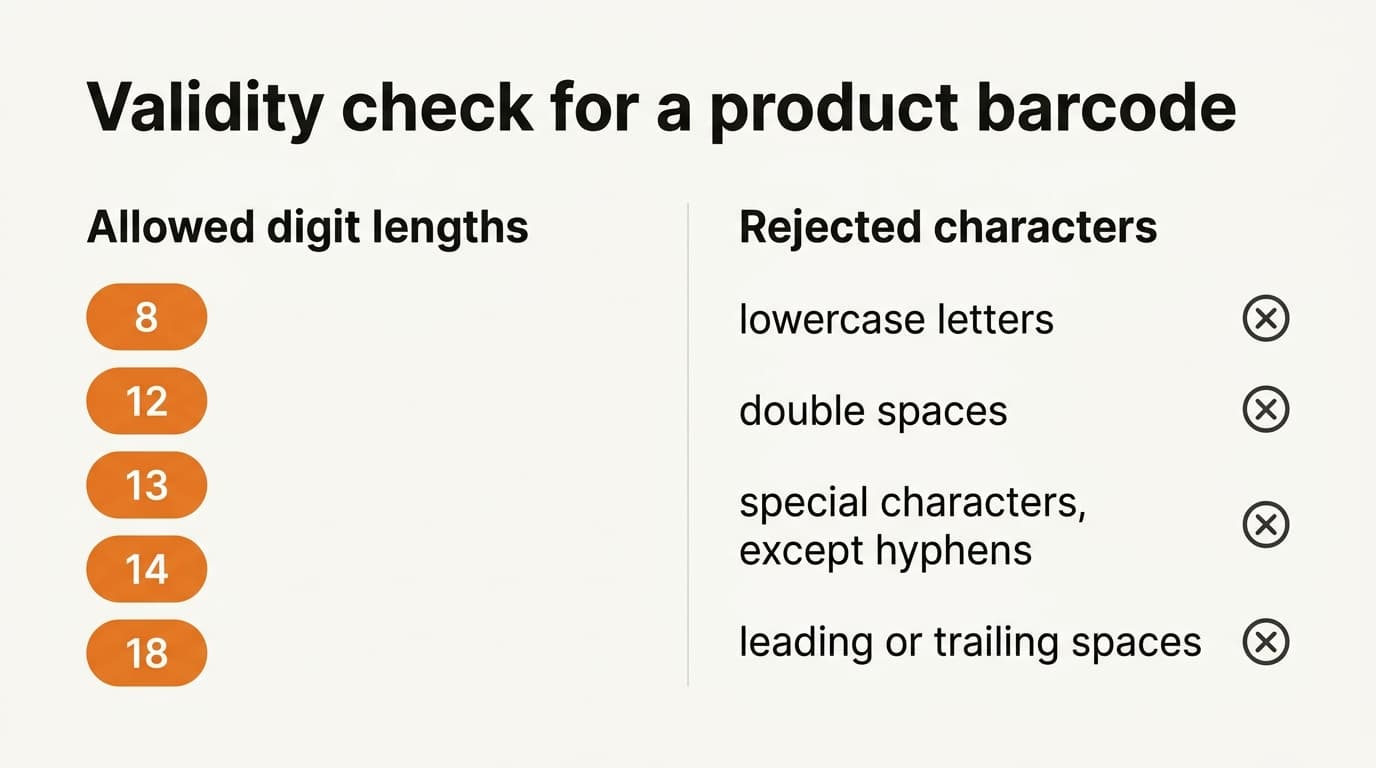
A valid standard barcode must be a recognized standard product code within an allowed digit length — commonly the 8, 12, 13, 14, and 18-digit formats used by the GS1 family (EAN-8, UPC-A, EAN-13, GTIN-14, and so on). Beyond length, Coupang enforces character rules:
- No lowercase letters
- No double spaces
- No special characters except hyphens
- No leading or trailing spaces
Codes that fail any of these are rejected when you create the product, not quietly accepted and dealt with later. For a Western brand, the practical upshot is reassuring but not automatic: your existing US or EU retail barcode very often qualifies as-is, because GTIN/EAN/UPC codes were built for exactly this kind of standard scanning. But "very often" is not "always." A code copied from a spreadsheet with a stray trailing space, or an internal SKU string that isn't a real standard code, will bounce.
The two paths when your unit has no barcode
There are exactly two legitimate ways to satisfy the requirement, and the right one depends on whether your retail unit already carries a real standard code.
- Supply your existing standard barcode. If your sellable unit carries a GTIN, EAN, or UPC on the packaging, enter that code. Confirm it passes the format rules above before you create the inbound.
- Declare no barcode and request a Coupang-generated one. If your units genuinely ship unmarked, flag the product with an explicit "auto-generate" reason so Coupang issues a code for it. This is a deliberate declaration in the product data — not an empty field.
The distinction matters because leaving the barcode blank is not a third path. Coupang's system treats an unexplained empty barcode differently from an explicit request to generate one. If your product truly has no retail code, say so in the data rather than hoping the gap gets filled downstream.
One trap catches brands who assume the master carton solves the problem: it does not. Rocket Growth expects units-per-box to be 1 at the item level, meaning each sellable unit is scanned individually. Your outer-carton or master-case barcode identifies the shipping container, not the retail unit, so it is never a substitute for a unit-level product code.
“A barcode-ready SKU is really a fully-specced SKU — the code is the key, but the warehouse also needs the unit's dimensions, weight, and fragility before it can inbound.”
Isaac Lee — CEO, Kontactic
The physical data that travels with the barcode
The barcode is necessary but not sufficient. To inbound a SKU, Coupang also needs each unit's physical profile: dimensions, weight, a fragility flag, and — for expiry-managed categories like food and cosmetics — shelf-life data.
This is why treating the barcode as a standalone checkbox is a mistake. The scan gets the warehouse the identity of the unit; the physical data tells it how to store, slot, and handle that unit safely. A code with no accompanying dimensions or weight is still an incomplete SKU. In practice, a "barcode-ready" product is a fully-specced product — the barcode just happens to be the field brands trip over first.
It is also worth remembering that this physical profile, once received, becomes the basis for what Coupang can actually sell. On Rocket Growth you can't push a stock count into Coupang — your sellable quantity is whatever the warehouse physically receives and scans in. The barcode is what lets that count exist at all.
The point of no return: the barcode locks at inbound
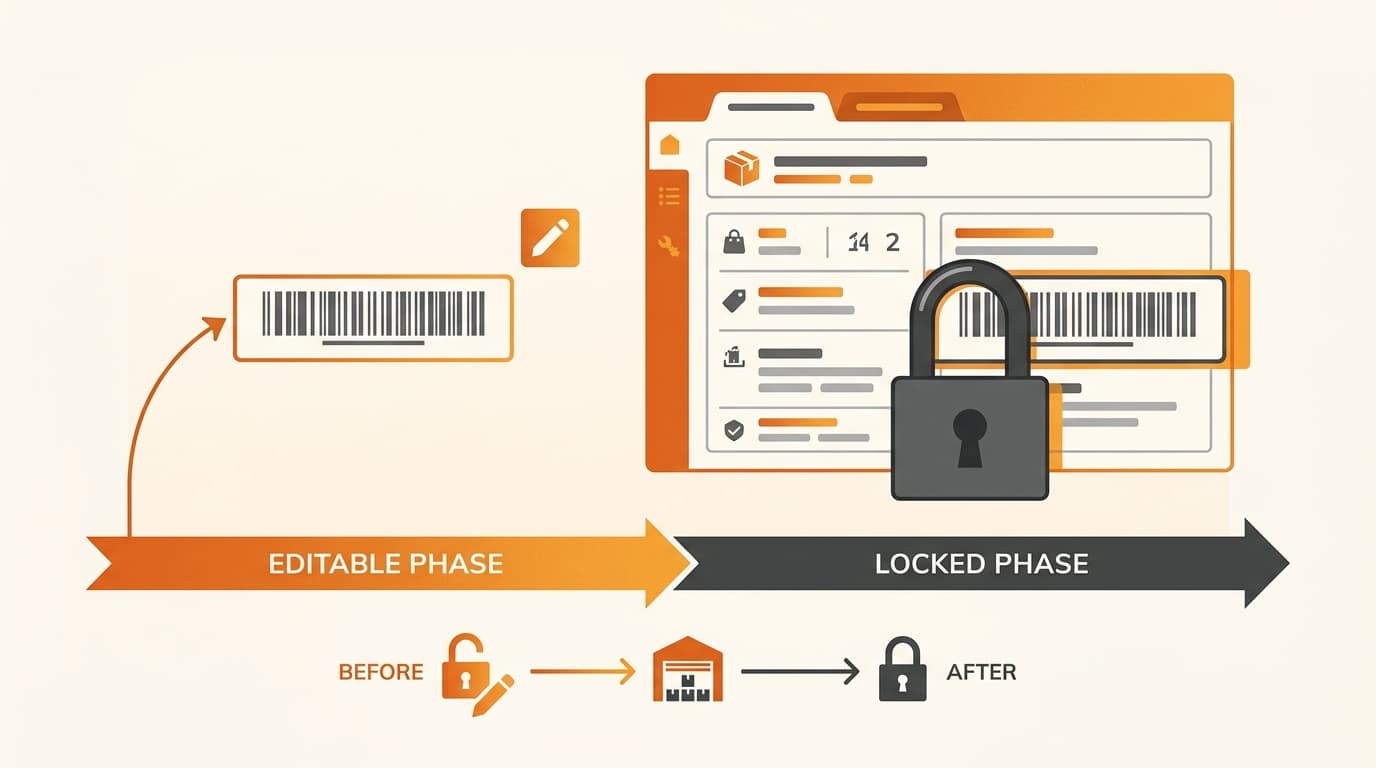
Here is the detail that turns a small formatting issue into an expensive one. The barcode can only be edited before an inbound is created against the SKU. Once you generate receiving for that item, Coupang locks the barcode — and you cannot change it afterward.
That single rule reframes the whole task. Verifying the barcode is correct is a pre-shipment step, not a cleanup you handle once goods are on the water. If you inbound with the wrong code — an internal SKU instead of a real GTIN, or a code with a hidden trailing space that somehow slipped through — unwinding it means canceling and recreating work you thought was done, sometimes after stock has already moved.
Treat the barcode as a launch-blocking, pre-shipment checkpoint. Confirm the code passes Coupang's format rules and matches the physical unit before you create the inbound, because the field becomes read-only the moment receiving is generated.
This is also the stage where Coupang's inbound verification catches label and certification mismatches — so a shipment with a clean, locked-in barcode still has to pass the rest of the receiving review. Getting the barcode right early keeps that review focused on the things you can't control at your desk.
Common questions
Does my US or EU retail barcode work on Coupang? Usually yes. GTIN, EAN, and UPC codes are standard product codes in the digit lengths Coupang recognizes. Confirm there are no lowercase letters, double spaces, non-hyphen special characters, or leading/trailing spaces before you create the inbound.
What if my product genuinely has no barcode? Declare it in the product data with an explicit request for Coupang to generate one. Don't leave the field blank — an unexplained empty barcode is treated differently from a deliberate auto-generate request.
Can I use my master-carton barcode instead? No. Rocket Growth scans each sellable unit individually and expects units-per-box of 1 at the item level, so a case or carton code doesn't identify the retail unit.
Can I fix the barcode after the shipment arrives? No. The barcode locks once an inbound is created against the SKU. Verify it before shipping; there is no clean after-the-fact edit.
Where can I confirm the exact rules? Coupang's official seller and developer documentation is the authoritative source for the current product-code format rules and inbound requirements. Check it against your own SKUs before your first Rocket Growth inbound, since inbound minimums and lead times also feed into the same first-shipment plan.
Getting your first Rocket Growth inbound right
If you're preparing your first shipment into Coupang Rocket Growth and want your SKUs barcode- and spec-ready before they ship, talk to Kontactic about how we handle inbound.
About the author
Korean and global e-commerce operators with 15+ years of cross-border experience, led by CEO Isaac Lee — KOTRA-certified consultant and official lecturer for Seoul City and the Korea Customs Service. We run Korea market entry for Western brands every day; this blog documents what we learn in the field.
More about Kontactic →Related Articles
Korean Importer Registration: Why a POA Is Not Enough
A power of attorney cannot establish Korean importer registration; corporate-authority proof and Korean importer records are still required for the filing.
Can You Delay Korea Import Duty on Consignment Stock?
No. Korea import duty and import VAT are normally assessed when consignment stock is cleared for domestic circulation, not when a Korean customer buys one unit.

Children’s Product KC: Does “Ages 13+” Avoid the Rules?
No. In Korea, “Ages 13+” is only one factor; design, intended use, packaging, and child-directed marketing can still trigger children’s-product KC rules.